You want rates now, not a new inbox problem
It usually starts the same way: five minutes between meetings, a browser tab open, and the expectation that “term life quotes” will behave like airfare. Then the form loads and the trade-off shows up immediately. The fastest-looking option wants a phone number “to personalize results,” while another promises rates with just age and zip code—until the next screen quietly asks for email. The friction isn’t just annoyance; it’s timing and control. A rushed submit can turn into a week of calls, or a rate list that never matched what you could actually buy.
The practical goal in this first step is narrower than “shop life insurance.” It’s to see a plausible price range without creating a follow-up obligation you didn’t agree to. That means noticing which sites treat contact info as the ticket to view numbers, and which let you browse first. If the page feels like it’s optimizing for lead capture, assume the “instant” part is for them, not for you, and slow down long enough to decide what you’re willing to trade: speed, privacy, or accuracy.
The first click: “instant quote” asks different basics
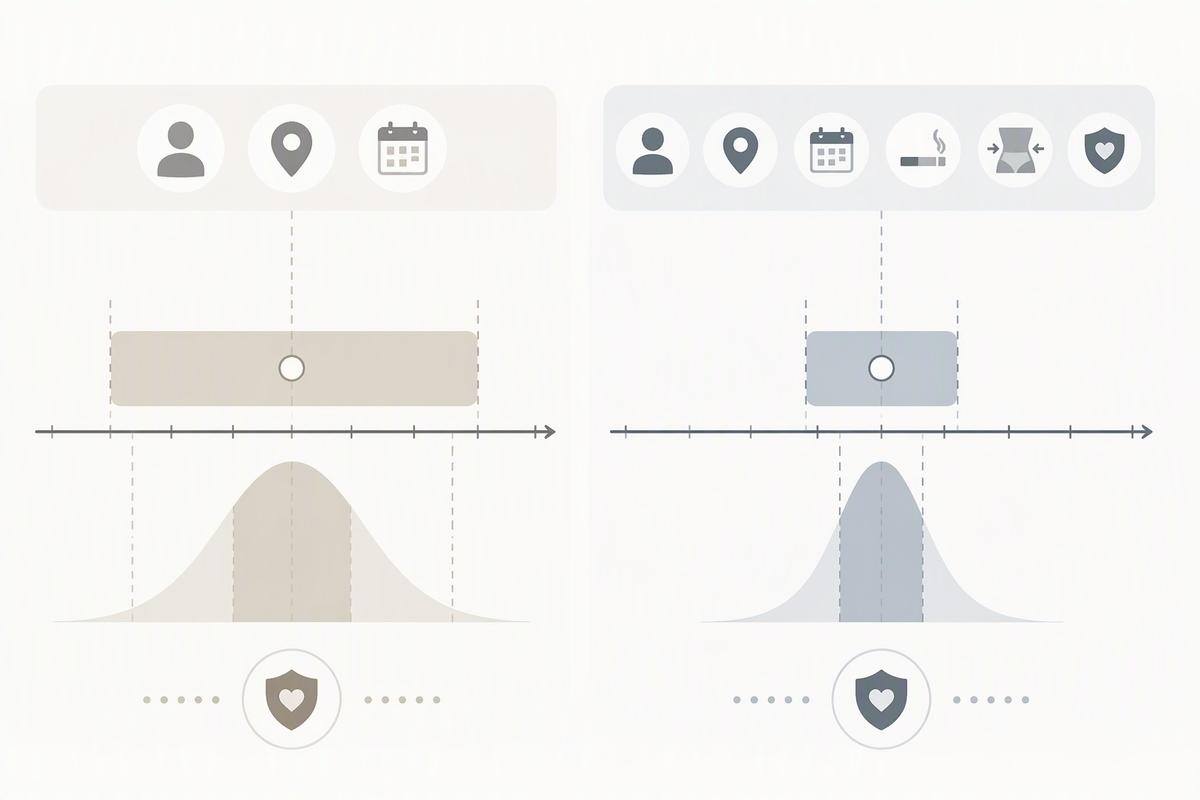
On that first “instant quote” screen, the basics aren’t actually basic in the same way. One site treats age, gender, zip code, and term length as enough to print a table. Another won’t show anything until it also has height/weight, and a rough health tier like “excellent/average.” Then there’s the version that looks minimal—just “coverage amount” and “birthday”—but the next step is a phone-number gate with language that implies it’s required to “unlock” rates. In practice, that’s where a five-minute shopping window turns into a consent decision you didn’t plan for.
The detail level changes what the number even represents. With only demographics, you’re seeing a broad, optimistic band that can assume a best-case risk class. Add smoking and build, and it starts behaving more like a pre-underwriting estimate. The moment a form asks for full date of birth, street address, or a specific insurer preference, expect the platform to be routing you into a tighter quote engine—or into lead distribution—and budget extra time for follow-ups.
Why identical shoppers see wildly different “rates”
After you’ve run the same age, zip code, term length, and face amount through two “instant quote” pages, the gap can feel like a glitch. It usually isn’t. One platform is showing a best-case placeholder that quietly assumes a top health class, while another is pricing you into a middle tier because it didn’t get enough detail to justify anything better. The constraint is that both have to put a number on the screen fast, and the easiest way to do that is to make an assumption you didn’t see.
Even when the inputs look identical, the quote engine behind them may not be. Some pull from a small set of carriers, some display “from” rates that only apply to a narrow slice of applicants, and some blend results across multiple risk classes to keep the range looking competitive. Timing matters too: rates change with exact age (not “about 40”), and a birthday boundary can move the price overnight. If one site asked for full date of birth and the other accepted an age dropdown, they aren’t even quoting the same person.
The other quiet driver is what they’re optimizing for. A lead-focused page benefits from showing the lowest plausible number to get a submit, then “correcting” later once height/weight, meds, or conditions appear. A tighter quoting flow often looks worse upfront, but it’s closer to what an insurer will actually offer, which saves time when the five-minute shopping window is gone and the follow-up starts.
Three platform types, three privacy trade-offs
Once you’ve seen how much the “same” inputs can drift, the next decision is less about carriers and more about which kind of platform you’re standing on. The first type is the lead marketplace: it’s optimized to collect contact info early, show an eye-catching low “from” rate, then hand you to multiple agents. The privacy cost is obvious, but the time cost is the sneakier one—one quick submit can create a week of interruptions, and it’s hard to undo.
The second type is a quote-engine aggregator that behaves more like pre-underwriting. It typically asks for build and tobacco before showing anything, and it may still want email, but it’s usually tighter about what happens next because it’s trying to keep you in a quoting flow. The third type is a captive or single-agency path: fewer carriers, sometimes fewer forms, but a higher chance that your identity (DOB, address) is required to continue. The trade-off isn’t moral, it’s mechanical: the more your rate depends on risk class, the more the platform wants data that’s hard to take back.
The moment health questions appear, accuracy jumps

The shift usually happens mid-form, right after height and weight: a question about prescriptions, sleep apnea, blood pressure, or a “last 5 years” checklist. It can feel intrusive, but it’s also the point where the math stops being a generic table and starts resembling an actual underwriting decision. Carriers price by risk class, and risk class doesn’t hinge on zip code or even build as much as it hinges on medical history patterns. That’s why the same person can look “Preferred” on a light form and “Standard” the moment a controlled condition or a medication shows up.
Accuracy jumps here for a simple reason: the platform no longer has to assume best case to keep the number competitive. Instead, it can route you into a narrower bucket and show fewer, more realistic options. The constraint is time and permanence. These questions take longer, and some sites treat the answers as the moment to turn the session into a record—often paired with a contact-info gate or a “save your results” prompt. If you’re trying to price-shop without creating a follow-up trail, this is the decision point: either stay high-level and accept that the rates are “marketing-clean,” or answer the health set and expect the results to be closer to what you can actually buy.
A practical sequence for shopping with boundaries
By the time the health checklist shows up, the useful move is to stop treating every tab the same and run a sequence on purpose. Start with one “browse-first” tool to set a rough band using only age range, zip, term, and face amount, then close it without “save” or “send results.” Next, rerun the same inputs on a tighter quote engine that asks for tobacco and build, but still lets you delay phone number. If the second result is consistently higher, treat the first one as a best-case teaser, not a bargain you missed.
Only after you’ve got two bands should you spend your privacy budget. Use a dedicated email alias, avoid your primary phone until you’ve picked a short list of carriers, and don’t enter full DOB or street address unless the platform clearly says it’s needed for an application-like quote. Then answer health questions once, in one place, to pressure-test realism. If the answers trigger a “we’ll call you” wall, you’ve learned the platform’s real product is follow-up, not pricing.
Choose your detail level based on what matters today
At this point the question isn’t “which rate is best,” it’s which kind of answer you need today. If you’re only sanity-checking affordability, stop at demographics and treat everything as a best-case range. If you’re trying to pick a carrier shortlist, add tobacco and build so the results behave more like pre-underwriting. If you’re within weeks of applying, the extra friction of meds and condition history is worth it because it reduces re-quoting later.
Make the trade explicit: low detail buys speed and less exposure, but it also buys surprise. High detail costs time and increases the chance of follow-up, yet it narrows uncertainty. When the goal is “no unwanted calls,” cap the form and move tabs. When the goal is “what will I actually pay,” accept the health questions once, on purpose, and let the rough quotes stay rough.